Troubleshooting, Permissions & Security
This section covers device permissions, troubleshooting procedures, security policies, and offline recovery protocols.
Device Permissions Checklist
For optimal functionality, the WORKVO mobile application requests the following permissions:
Location (Allow All the Time): - Required for Field Sales Specialists to transmit background GPS breadcrumbs during working hours. - Required for Office Staff to validate geofence radius on punch-in/out.
Camera: - Required for regular staff attendance selfie verification and receipt scanning.
Biometrics / Fingerprint: - Required for biometric quick unlock and hardware signature validation.
Storage / Notifications: - Required for saving PDF payslips and receiving high-priority shift and approval notices.
Profile & Security Management
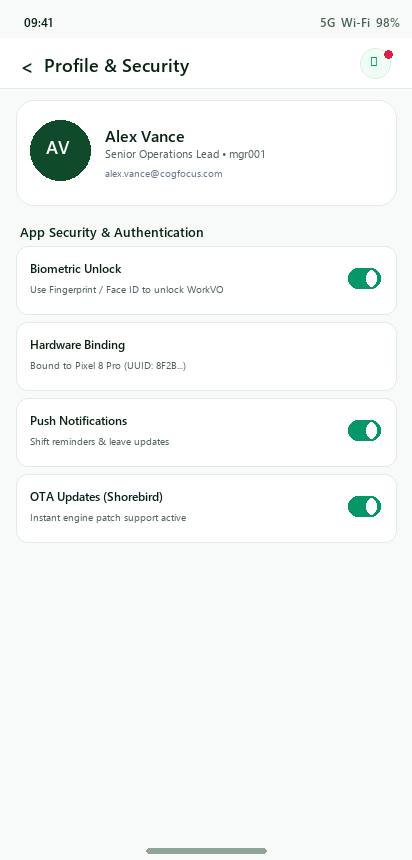
Employees can review their hardware binding state, configure biometric preferences, and request device changes from the Profile screen.
Common Issues & Resolutions
Issue 1: “Server Error 500” During File or Payslip Download
Root Cause: Database lock timeout caused by legacy SQLite journal mode during concurrent location batch inserts, or missing on-disk PDF files.
Permanent Fix Applied: 1. The server database has been upgraded to Write-Ahead Logging (WAL) mode (PRAGMA journal_mode=WAL; PRAGMA busy_timeout=60000;). 2. Location telemetry now uses high-performance bulk operations (bulk_create) with 4-stage exponential retry backoff. 3. The PDF payslip endpoint now supports on-the-fly dynamic rendering if a pre-generated file does not exist, ensuring 100% download reliability.
Issue 3: “Device Pending Approval” Message
Cause: The employee is attempting to log in from a new or different phone than their registered device.
Resolution: Contact the company administrator or manager. The manager can open the Device Approvals screen in the WORKVO Manager Portal and click Approve to authorize the new phone.
Issue 4: Edge-to-Edge Display on Android 15 (SDK 35)
Resolution: WORKVO incorporates full Android 15 edge-to-edge window inset handling (enableEdgeToEdge()), preventing content from being obscured by status or gesture bars across modern devices.